%20--%3e%3csvg%20version='1.0'%20id='Layer_1'%20xmlns='http://www.w3.org/2000/svg'%20xmlns:xlink='http://www.w3.org/1999/xlink'%20x='0px'%20y='0px'%20viewBox='0%200%20116%20130.5'%20style='enable-background:new%200%200%20116%20130.5;'%20xml:space='preserve'%3e%3cstyle%20type='text/css'%3e%20.st0{fill:%23FFFFFF;}%20%3c/style%3e%3cg%3e%3cg%3e%3cpath%20class='st0'%20d='M30.3,52.1l-0.4-0.3c-4.3,5.8-6.9,13-6.9,20.8c0,19.3,15.7,35,35,35c19.3,0,35-15.7,35-35%20c0-7.8-2.6-15-6.9-20.8l-0.4,0.4c-1.3,1.2-2.6,2.3-3.8,3.5c3.4,4.8,5.5,10.6,5.5,17c0,16.1-13.1,29.3-29.3,29.3%20c-16.1,0-29.3-13.1-29.3-29.3c0-6.3,2-12.2,5.4-17C32.9,54.4,31.6,53.2,30.3,52.1z'/%3e%3cpath%20class='st0'%20d='M23.5,45.7c-0.7-0.7-1.4-1.5-2-2.3c-6.4,8-10.2,18.1-10.2,29c0,25.7,20.9,46.7,46.7,46.7%20c25.7,0,46.7-20.9,46.7-46.7c0-11-3.8-21.1-10.2-29c-0.7,0.8-1.3,1.6-2,2.3L91,47.1l-0.6,0.5c5.3,6.9,8.4,15.5,8.4,24.8%20c0,22.6-18.4,40.9-40.9,40.9S17.1,95,17.1,72.4c0-9.3,3.1-17.9,8.4-24.8L24.8,47L23.5,45.7z'/%3e%3cpath%20class='st0'%20d='M100.3,32.9c-0.7,2-1.6,3.9-2.6,5.7c7.8,9.1,12.6,21,12.6,34c0,28.8-23.5,52.3-52.3,52.3%20c-28.8,0-52.3-23.5-52.3-52.3c0-13,4.8-24.8,12.6-34c-1-1.8-1.9-3.7-2.6-5.7C6,43.3,0,57.2,0,72.5c0,32,26,58,58,58%20c32,0,58-26,58-58C116,57.2,110,43.3,100.3,32.9z'/%3e%3cpath%20class='st0'%20d='M85.5,9.6c-4.1,3.4-29.8,26.8-32,28.9l-1.6,1.6l-0.9,0.9c-0.3,0.3-0.6,0.6-0.8,1c-1.1,1.3-2,2.8-2.7,4.3%20c-1.5,3-2.3,6.4-2.1,9.7c0.1,1.7,0.4,3.3,0.9,4.8c0.3,0.8,0.6,1.5,0.9,2.2c0.3,0.7,0.6,1.4,1,2.1c0.1-0.8,0.2-1.6,0.3-2.3%20c0.1-0.8,0.1-1.6,0.1-2.3c0.1-1.5,0.3-2.8,0.6-4.2c0.6-2.7,1.5-4.4,2.8-6.7c0.8-1.3,1.8-2.6,2.9-3.7c1.6-1.8,3.4-3.4,5.2-5.1%20c5-4.5,19.6-17.7,25.5-23.1L85.5,9.6z'/%3e%3cpath%20class='st0'%20d='M82,33.3c2.2-2.5,3.1-4.1,3.4-8.6l-0.1-1.8L58.4,48.6c-2,2.3-4.3,4.3-5.7,7.2c-1.4,2.9-2.3,7.2-2,10.5%20c0.1,1.6,0.5,3.2,1,4.7c0.3,0.8,0.6,1.5,0.9,2.2c0.3,0.7,0.6,1.4,0.9,2.1c0-1.5,0-3.1-0.1-4.6c0-1.5,0.1-2.9,0.3-4.2%20c0.5-2.7,2.8-8.7,5.9-11.8L82,33.3z'/%3e%3cpath%20class='st0'%20d='M90.1,17.9l0,3c0,0.9-0.1,1.8-0.2,2.6c-0.4,3.5-0.6,6.1-2.4,9.1c-0.9,1.5-3,3.7-4.2,4.9l-0.9,1l-1.1,1%20l-2.1,2.1c-2.9,2.8-5.7,5.5-8.6,8.3l-4.2,4.2l-2.1,2.1l-1,1.1l-1.1,1.2c-2.9,3.3-4.9,7.4-5.4,11.8c-0.3,2.2-0.2,4.3,0.3,6.4%20l0.2,0.8l0.2,0.8c0.2,0.5,0.3,1,0.5,1.5c0.4,0.9,0.7,1.9,1.1,2.8c0.2-2,0-4.1,0.2-6c0.2-1.9,0.5-3.7,1.1-5.4%20c1.2-3.4,3.1-6.5,5.6-9.1l1-0.9l1.1-1l2.2-2l4.4-4c3-2.6,5.9-5.3,8.8-8l2.2-2l1.1-1l1.2-1.1c1.5-1.6,4-3.6,5.1-5.4%20c2.3-3.8,2.7-7.9,3.2-12.3c0.1-1.1,0.2-2.2,0.2-3.3l0-3l-0.1-6C96.1,7.9,96,4,95.9,0l-5.8,5.4V17.9z'/%3e%3cg%3e%3cpath%20class='st0'%20d='M42.9,47.4c-2-2-4-3.9-6-5.8l-2.1-2.1l-1.1-1l-0.9-1c-1.2-1.3-2.3-2.7-3.2-4.2c-1.8-3-3-6.4-3.4-9.9%20c-0.1-0.9-0.2-1.8-0.2-2.6l0-3V5.4L20.1,0c-0.2,4-0.3,7.9-0.3,11.9l-0.1,6l0,3c0,1.1,0.1,2.2,0.2,3.3c0.5,4.4,1.9,8.7,4.3,12.5%20c1.2,1.9,2.5,3.7,4.1,5.2l1.2,1.1l1.1,1l2.2,2c2.9,2.7,5.9,5.4,8.8,8l0.8,0.7c0,0,0-0.1,0-0.1c0-0.4-0.1-0.8-0.1-1.2%20C42.1,51.5,42.3,49.4,42.9,47.4z'/%3e%3cpath%20class='st0'%20d='M31.1,9.6l0,8.1c0,0,15,14,19.5,18.1c0.7-0.7,2.4-2.2,4.6-4.2L31.1,9.6z'/%3e%3cpath%20class='st0'%20d='M31.1,22.9L48,38.4l-0.2,0.2c-0.3,0.3-0.6,0.6-0.8,1c-0.9,1.1-1.6,2.3-2.3,3.5C42.3,41,35,33.5,35,33.5%20S31.1,29.4,31.1,22.9z'/%3e%3c/g%3e%3c/g%3e%3c/g%3e%3c/svg%3e)


'%3e%3cmask%20id='mask0_3942_40921'%20style='mask-type:luminance'%20maskUnits='userSpaceOnUse'%20x='0'%20y='0'%20width='34'%20height='25'%3e%3cpath%20d='M34%200H0V25H34V0Z'%20fill='white'/%3e%3c/mask%3e%3cg%20mask='url(%23mask0_3942_40921)'%3e%3cpath%20d='M34%200H0V25H34V0Z'%20fill='white'/%3e%3cpath%20fill-rule='evenodd'%20clip-rule='evenodd'%20d='M0%200V25H34V0H0Z'%20fill='%23E31D1C'/%3e%3cmask%20id='mask1_3942_40921'%20style='mask-type:luminance'%20maskUnits='userSpaceOnUse'%20x='0'%20y='0'%20width='34'%20height='25'%3e%3cpath%20fill-rule='evenodd'%20clip-rule='evenodd'%20d='M0%200V25H34V0H0Z'%20fill='white'/%3e%3c/mask%3e%3cg%20mask='url(%23mask1_3942_40921)'%3e%3cpath%20fill-rule='evenodd'%20clip-rule='evenodd'%20d='M19.125%206.25H14.875V10.4167H10.625V14.5833H14.875V18.75H19.125V14.5833H23.375V10.4167H19.125V6.25Z'%20fill='%23F1F9FF'/%3e%3c/g%3e%3c/g%3e%3c/g%3e%3cdefs%3e%3cclipPath%20id='clip0_3942_40921'%3e%3crect%20width='34'%20height='25'%20rx='5'%20fill='white'/%3e%3c/clipPath%3e%3c/defs%3e%3c/svg%3e)
'%3e%3crect%20width='32'%20height='24'%20fill='white'/%3e%3cpath%20fill-rule='evenodd'%20clip-rule='evenodd'%20d='M22%200H32V24H22V0Z'%20fill='%23C51918'/%3e%3cpath%20fill-rule='evenodd'%20clip-rule='evenodd'%20d='M0%200H12V24H0V0Z'%20fill='%235EAA22'/%3e%3cpath%20fill-rule='evenodd'%20clip-rule='evenodd'%20d='M10%200H22V24H10V0Z'%20fill='white'/%3e%3c/g%3e%3cdefs%3e%3cclipPath%20id='clip0_270_67407'%3e%3crect%20width='32'%20height='24'%20fill='white'/%3e%3c/clipPath%3e%3c/defs%3e%3c/svg%3e)
Everything Shopify POS needs to trade compliantly in Germany.
OpenFiskal puts fiscalisation, receipts, daily cash operations, reporting and audit exports directly around Shopify POS. No second point of sale system, no extra hardware.
From the sale to the tax audit
- 01
Sale
The Shopify POS workflow stays exactly as it is.
- 02
Fiscalisation
Signed by the cloud TSE at the moment of entry.
- 03
Receipt
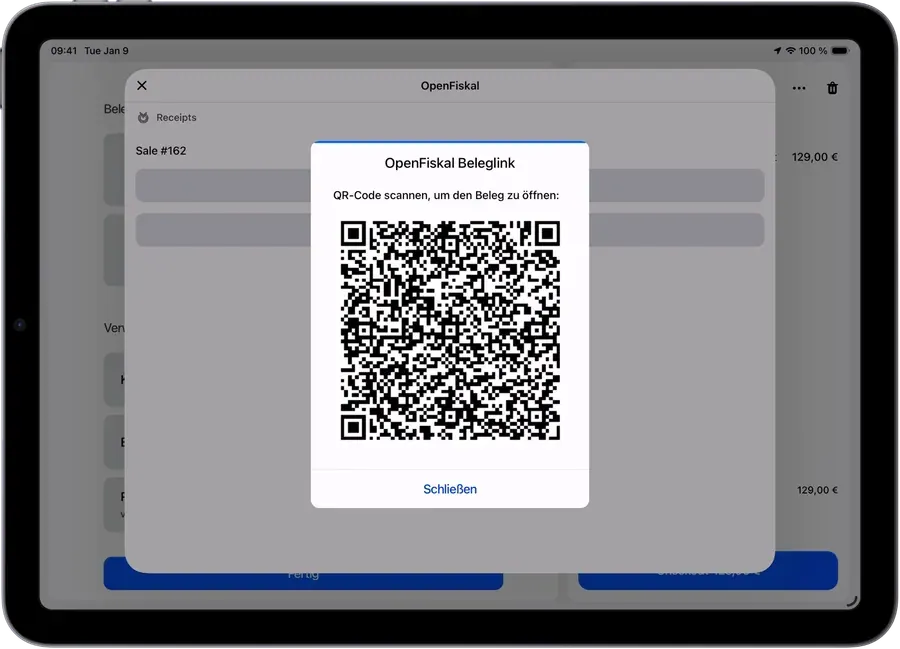
Printed, emailed or shown as a QR code at the till.
- 04
Daily closing
Z-report as a PDF, straight from POS data.
- 05
Accounting
Cash book and CSV export for your bookkeeping.
- 06
Audit
DSFinV-K export for cash register inspections.
Every transaction signed, every receipt complete
The legal requirements apply at the moment of sale. OpenFiskal handles them in the background without changing anything at the till.
All transaction types
Sales, returns, exchanges, split payments, open orders, mixed tax rates, tips and discounts are all signed.
Receipts in three formats
Printed on any Shopify POS printer, emailed through Shopify itself, or shown as a QR code at the till. Always with the TSE signature and the mandatory details.
Open, run and close the day cleanly
Cash, daily closing and multi location work come together in the app instead of in a spreadsheet at month end.
One cash book per location
Locations are kept apart so each store has its own traceable cash record.
CSV export for accounting
GoBD compliant CSV export at the press of a button, ready for your bookkeeping.
Ready for whatever the tax office asks for
Registration duties and audit documents are prepared before anyone requests them.
Register notification to the tax office
Since July 2025 every electronic register must be reported. TSE serial number, BSI certification ID, commissioning date and eAS serial number are shown with a copy button for ELSTER.
Submission with Meldefluss
For more convenience, our second app Meldefluss provides PDF and XML export or submission to ELSTER.
Auditable records
All records stay tamper proof and traceable down to the individual register.
Fiscalisation without bending Shopify POS out of shape.
Your team keeps working in Shopify POS. OpenFiskal sits underneath as the German fiscal layer and only shows up where the law requires it: signature, receipt and closing.
- Runs inside the Shopify POS app on the iPad you already use
- Covers sales, returns, exchanges, split payments and tips
- Mixed tax rates and discounts are reported correctly
- Works with any receipt printer supported by Shopify POS
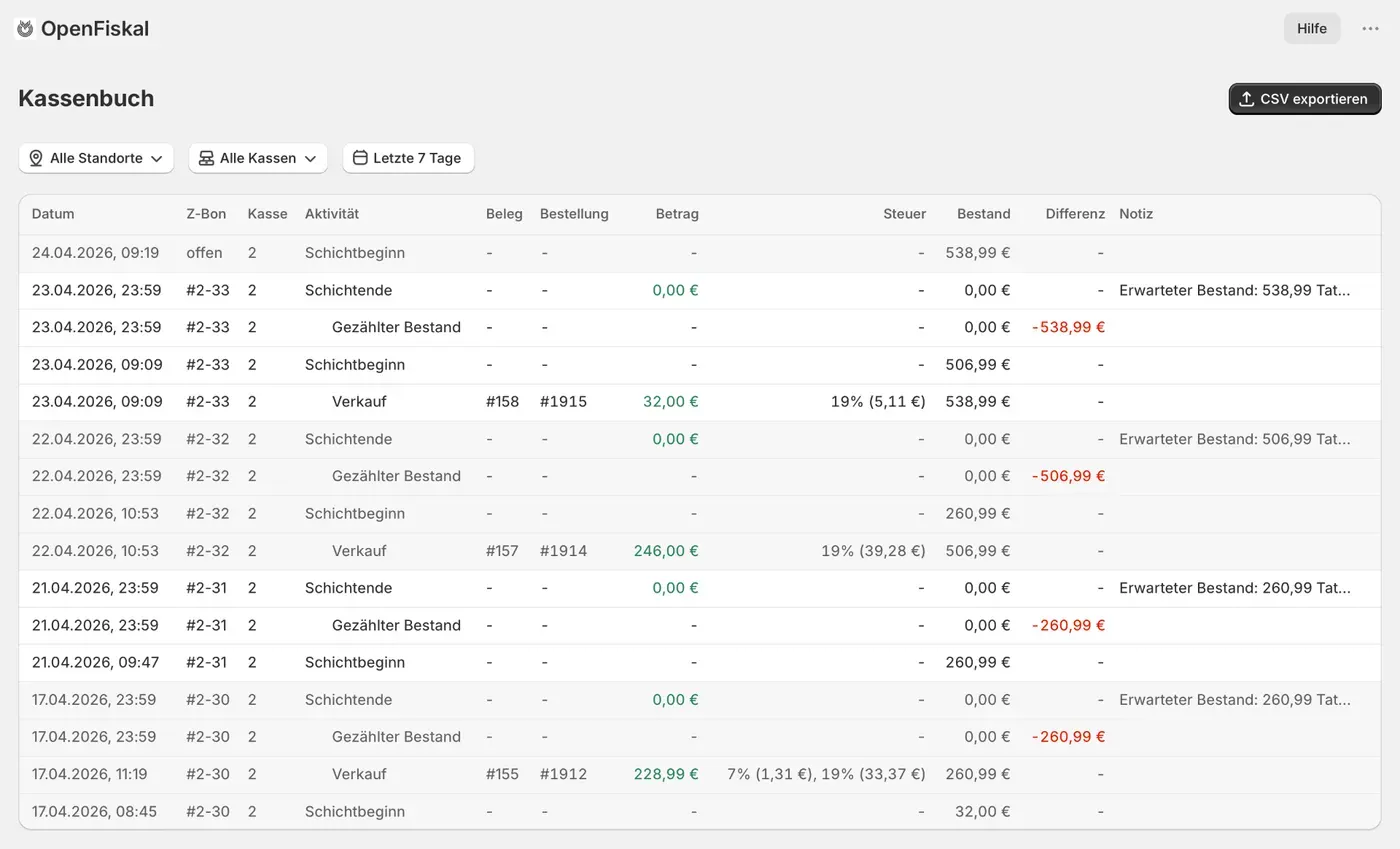
The cash book your accountant expects
Instead of a spreadsheet at month end, OpenFiskal keeps the cash book current every day. Every movement carries a reason and a timestamp and is traceable back to the register.
- Updated daily, no catching up at month end
- CSV export for further processing
- A separate cash book per location
Individual features in detail
These topics have their own pages covering the requirements, how OpenFiskal implements them and common questions.
- Cloud TSECertified technical security device for Shopify POS, with no extra hardware.
- KassenSichVCompliant fiscalisation for Shopify POS in Germany.
- DSFinV-K exportStandardised data exports for cash register audits.
- Cash bookDocument and reconcile every cash movement.
- Z-reportDaily closing reports straight from your POS data.
Run Shopify POS compliantly in Germany
Install OpenFiskal from the Shopify App Store, or let us walk you through fiscalisation in a short demo.